Blittar: A Script Font for Handmade Brands
As a creator who spends hours perfecting the curve of a sticker or the layout of a wedding invitation, I know that typography is not just an afterthought. It is the voice of your brand. When you are selling physical goods or digital downloads, the typeface you choose communicates quality before the customer even reads the words. This is why discovering Blittar felt like finding a missing piece in my design toolkit. Part of the curated Script Amp collection, this trendy script handwritten font exudes a vividness and class that is difficult to find in standard system fonts. It was particularly crafted for those of us who need a beautiful and refreshing look to elevate our designs from good to unforgettable.
The Visual Personality of Blittar
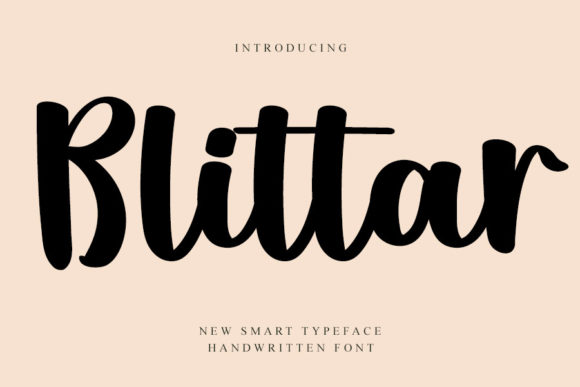
Blittar strikes a delicate balance between casual warmth and sophisticated elegance. Many script fonts lean too heavily into one direction: they are either so loose and quirky that they become hard to read, or so rigid and formal that they lose their human touch. Blittar sits comfortably in the middle. It feels authentic, like a note written by hand with a high-quality brush pen, yet it maintains enough structure to remain legible at various sizes. This makes it an ideal display font for projects where you want to convey personality without sacrificing clarity.
The strokes have a natural flow, mimicking the pressure variations of real handwriting. This organic feel adds immediate emotional appeal to your products. Whether you are designing a heartfelt greeting card or a chic product label, the font invites the viewer in. It suggests care, attention to detail, and a personal touch—values that are central to any handmade business or boutique brand.
Practical Applications for Crafters and Sellers
The true test of any creative font is its versatility in real-world applications. I have found Blittar to be exceptionally useful across a wide range of craft and product-based projects. Here is how you can integrate this premium font into your shop:
- Product Labels and Packaging: For candle makers, soap artisans, and skincare brands, Blittar adds a layer of luxury to simple labels. Imagine a minimalist kraft paper label on a soy candle, with the scent name written in Blittar. The contrast between the rustic paper and the elegant script creates a high-end aesthetic that justifies a higher price point.
- Wedding and Event Stationery: Invitation designers will appreciate how Blittar handles names and dates. It works beautifully on wedding welcome boards, save-the-dates, and menu cards. The font’s classiness aligns perfectly with modern wedding trends that favor clean lines mixed with soft, romantic typography.
- Digital Printables and Planner Pages: If you sell digital downloads on Etsy, Blittar is perfect for header titles in planners, journal covers, and motivational wall art. Its readability ensures that even when printed at home by customers, the text remains crisp and inviting.
- Apparel and Home Decor: For Cricut and Silhouette users, this font cuts cleanly. It is excellent for heat-transfer vinyl (HTV) projects like tote bags, t-shirts, and farmhouse-style wooden signs. The connected letters create a cohesive look that stands out on fabric and wood.
Readability and Design Best Practices
While Blittar is highly readable for a script font, it is important to use it wisely. As a general rule, script fonts are best suited for short phrases, titles, names, and decorative wording. They are not designed for long paragraphs of body text. Using Blittar for a product description or a long letter will strain the reader’s eyes and diminish the impact of the design.
To maximize effectiveness, consider the size and spacing. When using Blittar for small stickers or tiny product tags, ensure there is enough padding around the text. If the letters are too close to the edge of the cut line, the intricate swashes might get trimmed off. Always do a test print or a weed test with your cutting machine to confirm that the finer details hold up at your desired size. For digital mockups, zoom in to 100% to check for any pixelation or awkward overlaps between characters.
Mastering Font Pairing
A single font rarely carries a whole design. To create a balanced composition, you need to pair Blittar with complementary typefaces. Since Blittar is an expressive handwritten font, it pairs best with clean, neutral fonts that do not compete for attention.
A classic combination is pairing Blittar with a simple sans serif font. The geometric simplicity of a sans serif provides a modern anchor that lets the script shine. For example, use Blittar for the main title of a birthday invitation and a lightweight sans serif for the date and location details. Alternatively, you can pair it with a traditional serif font for a more vintage or literary feel. This works well for book covers, boutique logos, or artisanal food packaging where you want to evoke a sense of heritage and trust.
Avoid pairing Blittar with other script fonts or overly decorative display fonts. This creates visual clutter and makes the design look amateurish. Let Blittar be the star, and use secondary fonts strictly for support and information hierarchy.
Technical Features and File Formats
When investing in a new typeface, it is essential to check what is included in the download. High-quality fonts like those in the Script Amp category often come with extra features that enhance customization. Look for alternates, ligatures, and swashes. These allow you to vary the look of specific letters, preventing repetition in longer words and adding unique flair to logo design or monograms.
Ensure you have access to the necessary file formats for your workflow. Typically, you will need OTF or TTF files for installation on your computer for use in software like Photoshop, Illustrator, Canva, or Procreate. If you are creating SVG-style designs for cutting machines, you may need to convert the text to paths or use software that supports font embedding. Checking for multilingual support is also crucial if you plan to sell to an international audience, ensuring that accented characters render correctly.
Licensing for Commercial Use
One of the most critical aspects of running a creative business is understanding licensing. Before using Blittar in any product you intend to sell, review the license agreement carefully. Most commercial fonts allow you to use the typeface in the creation of physical end products, such as printed invitations, labeled candles, or stamped shirts. This means you can sell the item containing the font, but you cannot sell the font file itself.
If you are creating digital templates, printable art, or design assets for resale, verify that the license covers digital commercial use. Some licenses require an extended upgrade for templates where the end user can edit the text. Protecting your business from copyright issues is just as important as the design itself, so always keep your license certificates organized. Using properly licensed commercial font files ensures that your brand identity is built on a solid, legal foundation, allowing you to focus on what you do best: creating beautiful, meaningful products.